Your App Works. But It May Be Serving Data to Anyone Who Opens the Browser Console
Why apps on Lovable and Supabase can expose personal data and how to check yours in 20 minutes: real cases and three simple checks.
 Anton Blahoveshchensky, yaydeploy
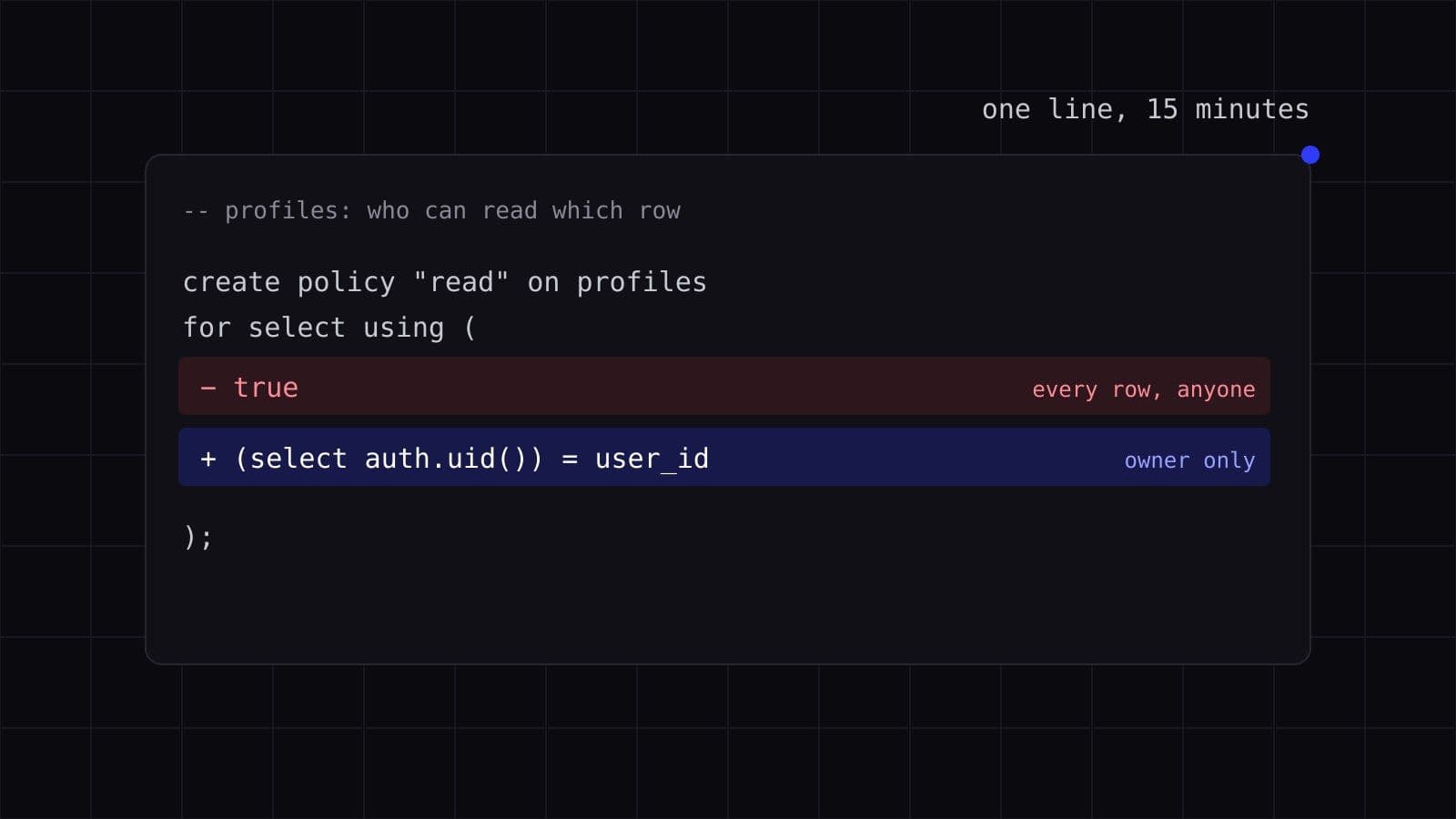
In May 2026, Penetrify, a company that runs a service for automatically finding vulnerabilities in websites, described this case. A founder built a SaaS on Next.js and Supabase in 48 hours at a hackathon. After Product Hunt, it got more than 200 users in the first week and started making revenue. Clean UI, working Stripe payments, a polished onboarding flow.
The scanner found a critical issue in eight minutes. The profiles table had no rules defining who can see which records, so any logged-in user could get the names and emails of every other user with one request. And because the app did not check whether an email was confirmed, anyone could become "logged in": just sign up with any address.
Everything worked: sign-up, login, payments, and the bug showed no symptoms at all. He fixed it in one evening, and the logs showed no signs of outside access. But the door had been open the whole time the app was live.
If you have built an app on Lovable, Replit, Bolt, Cursor, or a similar tool and it works — that is already a big achievement. Code gets cheaper every year. Ideas do not. The people who bring ideas to life while others are still writing specs create the most valuable part. But fast building has a blind spot, and it surfaces not when the app crashes, but when other people's data appears: payments, addresses, accounts.
This article is about a step that is easy to miss, and how to check in 20 minutes whether you missed it.
Why This Happens
When an app stores data in Supabase (as Lovable apps do, for example), the user's browser talks to the database directly — through a public key: the anon key or, in newer projects, a key that looks like sb_publishable_…. By design, this key is not a secret: it sits in the page code and is visible to anyone. That is normal. The key is not the problem.
Row access must be restricted by Row Level Security (RLS) — a setting inside the database itself that decides who sees which row. Without RLS, or with a broad policy ("anyone can read"), the public key opens the entire table.
Over the past year, Supabase has done a lot to keep this from happening by default:
- tables created in the dashboard get RLS automatically;
- a table without RLS is marked with a warning, and the project owner gets an email;
- since October 30, 2026, in all projects, new tables are not exposed to the API without an explicit grant (GRANT).
But there are caveats. Tables created via SQL or migrations — which is how AI tools often create them — do not get RLS on their own. Tables created before October keep their previous access. To make the app work, someone still grants access to new tables — by hand or through the same AI agent. And most importantly: RLS being enabled does not mean the policy restricts anything (more on this in Check 3).
Lovable checks apps before publishing and gives recommendations, but according to the company, applying them is the owner's decision. The warnings exist. They are easy to miss when everything works, and fixing the problem is still on you.
Why doesn't AI take this step on its own? Language models are trained to produce code that works functionally, and they usually do not add checks like "does this record belong to this user" unless explicitly asked. Nothing in the prompt "build me a dashboard" requires access policies — so the output often has none.
This happens often. In 2025, Veracode tested code from more than 100 language models: 45% of samples contained vulnerabilities from the OWASP Top 10. In 2025, a researcher checked 1,645 apps from the Lovable showcase and found that 170 of them had tables readable with the public key alone (CVE-2025-48757). Escape.tech scanned more than 5,600 published apps built on similar platforms and found more than 2,000 high-impact vulnerabilities, more than 400 exposed secrets, and 175 cases of exposed personal data.
Two Cases, One Mechanism
Here are two documented cases. The symptoms differ, the cause is the same.
EdTech app on Lovable, February 2026. Researcher Taimur Khan found an exam-generation and grading app listed on the Lovable Discover showcase. It had 16 vulnerabilities, 6 of them critical. The access-control logic was inverted: it blocked logged-in users and let anonymous visitors through. 18,697 records were exposed: 14,928 unique emails, 4,538 student accounts, 10,505 corporate users; 870 people had all their personal data exposed. An anonymous visitor could read records, send mass emails, delete accounts, and change grades. Those affected included students at UC Berkeley and UC Davis, and likely minors from schools.
Lovable responded that every project gets a free security scan before publishing, and applying the recommendations is the owner's decision. According to the company, the app also contained code not written by Lovable.
Moltbook, January–February 2026. A social network for AI agents; its creator said he did not write a single line of code himself. Wiz researchers found a public Supabase key in the client-side JavaScript. That alone is normal — but RLS was missing, so the key gave anonymous read and write access to the entire database. About 4.75 million records were exposed, including 1.5 million API tokens, 35,000 email addresses, and thousands of private messages; some contained OpenAI keys in plain text. This happened within days of launch; after Wiz reported it, access was closed within hours.
Different symptoms — inverted access control in one case, missing RLS in the other. One mechanism: the browser talks to the data directly, and the rules that should restrict access are either absent or do not work as intended.
Research by UpGuard shows the scale. In September 2026, the company checked about 300,000 websites that appear to run on Supabase and found 16,326 databases open for reading; judging by their table structure, more than half held personal data. UpGuard links the scale to AI tools: by its estimate, more than 60% of new Supabase databases are created by AI agents, and their users often do not know which access settings are required.
What This Means for You — and What to Check in 20 Minutes
If you have already launched or are preparing to launch, here are three checks. They will show whether you have this problem, though they do not replace a full audit.
Check 1. Does your app talk to Supabase directly?
Go to your site, open developer tools (F12), switch to the Network tab, and reload the page. Look for requests to an address ending in .supabase.co. If they are there, the browser talks to the database directly, and the public key is visible in the requests, as expected. That is not a problem. But look at what these requests return: if the response contains other users' records, you have already found the problem.
Check 2. Is RLS enabled on tables with personal data?
Go to the Supabase dashboard and open Table Editor. Every table that stores emails, phone numbers, payments, or any personal data must have Row Level Security enabled. A table without RLS is marked with a warning — that is the first thing to fix.
Check 3. Does the policy restrict rows — or just allow reading?
This is the most important and most overlooked check. RLS enabled with a policy using (true) is equivalent to no RLS: the database returns all rows to anyone. A policy using (auth.uid() is not null) does not save you either: Supabase sign-up is open by default, and "any logged-in user" means "anyone who created an account in ten seconds." The correct policy ties the row to its owner: using ((select auth.uid()) = user_id).
These three steps do not guarantee you have closed everything. There are secret keys (service_role or sb_secret_…) that bypass RLS entirely, views and functions that can bypass it, and policies that look correct but let extra rows through. But they give you a map: you either find the problem and realize you do not know how to fix it, or you do not find it and want to make sure you did not miss something else.
Why This Is Worth Checking Now, Not "Later"
According to IBM, the average cost of a breach is $4.44 million, but that figure is for large companies. For a small app, the cost looks different: an email to every user saying their data was exposed; a possible notice to a regulator — in the EU, for example, GDPR requires it within 72 hours of discovery if the breach puts people at risk; and the question your first customers will ask themselves: can we trust you?
Meanwhile, the fix is usually cheap. In the case from the start of this article, enabling RLS and adding policies took about 15 minutes, and all five findings were fixed in under two hours, without rewriting code. The most expensive part is the time while nobody knows about the problem.
What We Do — and What We Do Not Do
The three checks show whether the problem exists. Fixing it for your app is harder: the right policies depend on how your tables are structured and who should see what, and a wrong policy fails just as silently as missing RLS. This is where we can help.
We do not rewrite your product from scratch. We do not take your code. We do not require you to switch stacks.
We close the blind spot left after the build: we check which tables with personal data are exposed, fix RLS policies, set up automated checks that block deployment on critical findings, and hand the product back to you — ready to grow, so you can keep building it the way you have been.
In 20 minutes we will check five things and send a one-page result. Free, no installation, no obligations.
Here are the five things:
- Is a secret key (
service_roleorsb_secret_…) in client-side code? (This is critical: a public key is fine, a secret key is not.) - Is RLS enabled on tables with emails, phone numbers, or payments?
- Does the policy allow reading "for everyone" or "for any logged-in user" instead of checking the owner?
- Are
.envfiles or keys in a public repository? - Does the database return records on page load without signing in?
Not sure you found everything? Our Access & data test signs in as different users and tries to open each other's data. Access & data test →
Keep building. When you need help, reach out.
Sources
- Penetrify, “Supabase RLS Misconfiguration: How a Missing Policy Exposed Every User's Profile”, May 13, 2026
- Supabase, “Supabase Security Retro: 2025”, January 7, 2026
- Supabase, “Breaking Change: Tables not exposed to Data and GraphQL API automatically”, April 28, 2026
- The Register, “Lovable-hosted app littered with basic flaws exposed 18K users”, February 27, 2026
- TechRadar, “AI agent social media network Moltbook is a security disaster” (based on the Wiz report)
- Neowin, “Moltbook had an exposed database…” (4.75M records, based on the Wiz report)
- UpGuard, “Everything Everywhere: Systemic Data Exposure in Supabase Apps”, September 25, 2026
- CVE-2025-48757
- Veracode, 2025 GenAI Code Security Report
- Escape.tech, study of 5,600 apps on vibe-coding platforms
- IBM, Cost of a Data Breach Report 2025